
How to E-File ITR Online: Step-by-Step Guide for FY 2024-25 (AY 2025-26)
Filing your Income Tax Return (ITR) doesn't need to be overwhelming. Whether you're a salaried professional, freelancer, or business owner, the government's e-filing portal makes tax filing quick, digital, and paperless.
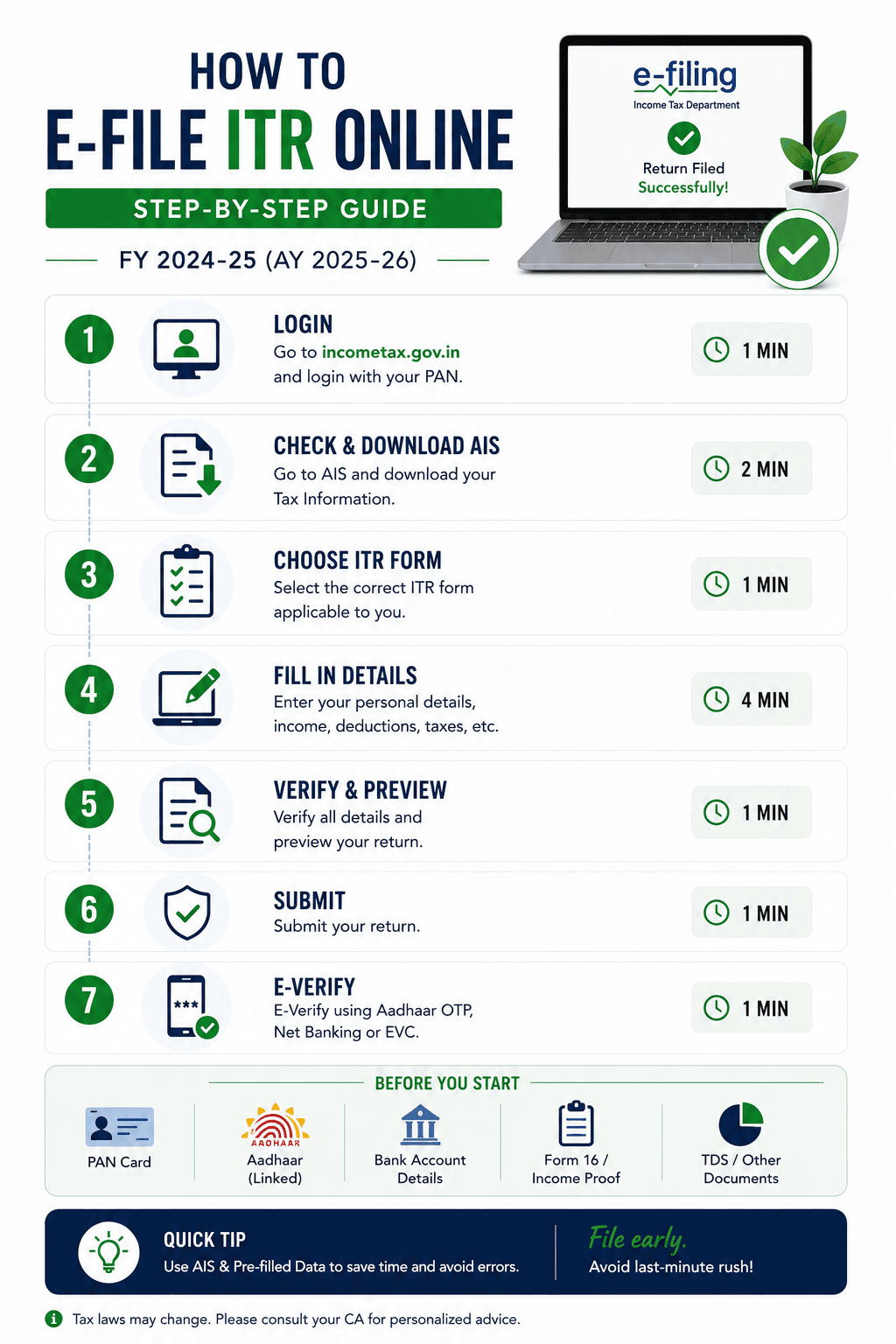
Filing your Income Tax Return (ITR) doesn't need to be overwhelming. Whether you're a salaried professional, freelancer, or business owner, the Indian government's e-filing portal makes the process quick, secure, and paperless. In this step-by-step guide, we'll show you exactly how to file your ITR online for FY 2024-25 using the official Income Tax India e-Filing portal.
Why File Your ITR Online?
- It's fast and fully digital — no paperwork or waiting in queues
- Auto-fetch your income and TDS details directly from TRACES
- Ensures compliance and avoids penalties
- Helps you claim tax refunds accurately
Step-by-Step Process to File ITR Online
Step 1: Register/Login to e-Filing Portal
- Go to incometax.gov.in
- Click on Login and enter your PAN and password
- If you're a first-time user, click "Register" and follow the instructions
Step 2: Choose "File Income Tax Return"
- From the dashboard, click e-File > Income Tax Return > File Income Tax Return
- Choose the relevant Assessment Year (e.g., AY 2025-26)
- Select the correct mode: Online
- Choose the appropriate option: Original/Revised ITR
Step 3: Select the Appropriate ITR Form
- ITR-1 (Sahaj): Salaried individuals with income below ₹50 lakh
- ITR-2: Income from capital gains or more than one house
- ITR-3/4: Business or professional income
Step 4: Fill in Income and Tax Details
- Verify pre-filled details (salary, interest, TDS)
- Add deductions under various sections (80C, 80D, etc.)
Step 5: Confirm Tax Liability or Refund
- The system auto-calculates your final tax payable or refund
- Review it carefully and make any balance payment if needed
Step 6: Submit and Verify Your Return
- Submit the return
- e-Verify using Aadhaar OTP, Net banking, Digital Signature, Demat account, or Bank ATM — or send signed ITR-V to CPC Bengaluru.
Documents You May Need Before You Start
- PAN and Aadhaar
- Bank account details
- Form-16 from your employer(s)
- Form 26AS (all tax deducted details)
- Investment proofs (80C, 80D, NPS, etc.)
- Capital gain statements (if applicable)
- Interest certificates from bank/post office
Final Thoughts
Getting through your ITR online is simple and stress-free. If you want to save time, avoid errors, and ensure maximum refunds, let TaxSavvy handle your e-filing journey — start to finish.
Frequently Asked Questions
Can I file my ITR online without a CA?
Yes! The Income Tax e-filing portal is designed for self-filing. However, expert help ensures accuracy and maximum benefits.
Which ITR form should I select?
It depends on your income type. ITR-1 is for salaried individuals with income < ₹50 lakh. Use ITR-2 or ITR-3/4 if you have capital gains or business income.
What's the last date to file ITR for FY 2024-25?
July 31, 2025, unless extended by the government.
Do I need to upload any documents during filing?
No, but you should retain all relevant documents in case of a tax department query.
What if I forget to verify my return?
Your ITR is considered incomplete. You must verify it within 30 days of filing.
Is Aadhaar linking mandatory for e-filing?
Yes. Linking PAN and Aadhaar is mandatory to file and verify your ITR.
How will I receive my tax refund?
Refunds are directly credited to your pre-validated bank account via NEFT/RTGS.
Can I revise my ITR after submission?
Yes. You can revise your return any time before December 31 of the assessment year.
What happens if I file ITR late?
You may be charged a late fee (up to ₹5,000) and lose certain benefits like loss carry-forward.
Can TaxSavvy help me file my ITR?
Absolutely! Our experts handle everything for you — from data entry to verification — ensuring a hassle-free experience.